INTRADE AFRICAMARKET360 DATA CONSOLE

INTEGRATION-READY PLANNING & VISUALISATION

Market360 Data Console

Build the plan. Connect it to execution.

Bring your data and the wider market into context. See where consumers are, find whitespace and build plans your business systems can use.

The Market360 Data Console is an independent planning and visualisation workspace for your own data, Intrade’s Market360 datasets, or both. It connects customer performance, market coverage and consumer context so sales, analytics and trade-marketing teams can identify growth opportunities and build integration-ready plans for existing BI and operational systems.

Customer coverage, wider market, consumer density and whitespace in one view

Your data. The market. A clearer view of opportunity.

Bring customer, outlet and distributor records together with selected Market360 intelligence, Census360 findings and Audit360 readings. Explorer, maps and Data Viewer connect locations to their profiles and provide four complementary views:

  • Your data. Understand customer performance, existing routes and territories. Match records to market identities, review coverage and preserve links to your own systems.
  • The wider market. Explore outlet types, categories, commercial profiles and DEEP Indexes to benchmark your footprint and identify prospects beyond your current customer base.
  • Where consumers are. View locations alongside consumer density, visitor catchments and time-based activity. Compare how your footprint aligns with the relative share of observed consumer activity.
  • Whitespace opportunity. Compare your coverage with market potential, consumer context and distributor or wholesaler reach. Identify unserved outlets, underserved areas and gaps worth prioritising.

Consumer activity adds context. Available layers and comparisons depend on source coverage and package scope.
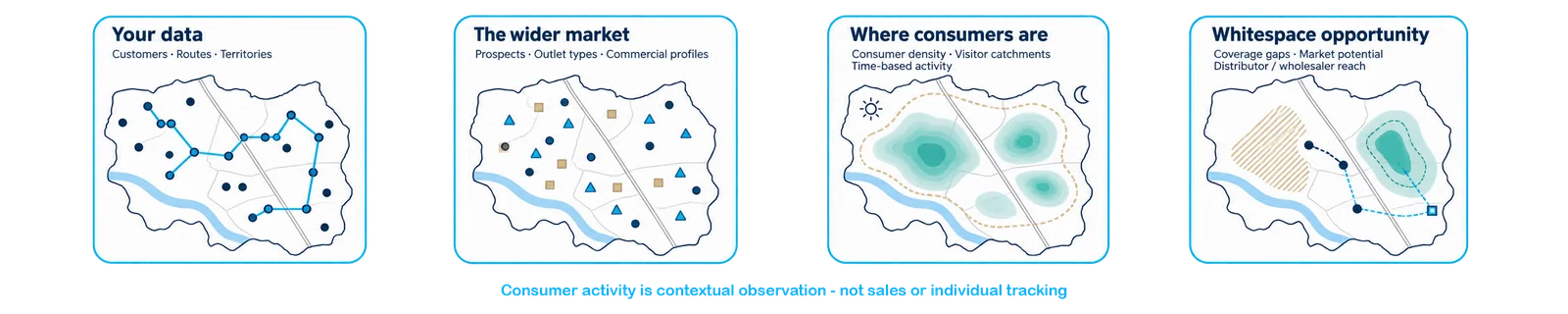
Four complementary views of the same market

DEEP: Discover → Execute → Expand → Progress

Discover the market, plan execution, expand into whitespace and use new evidence to improve the next cycle.
INTRADE AFRICAMARKET360 DATA CONSOLE

Drive the Data Refinery through self-service

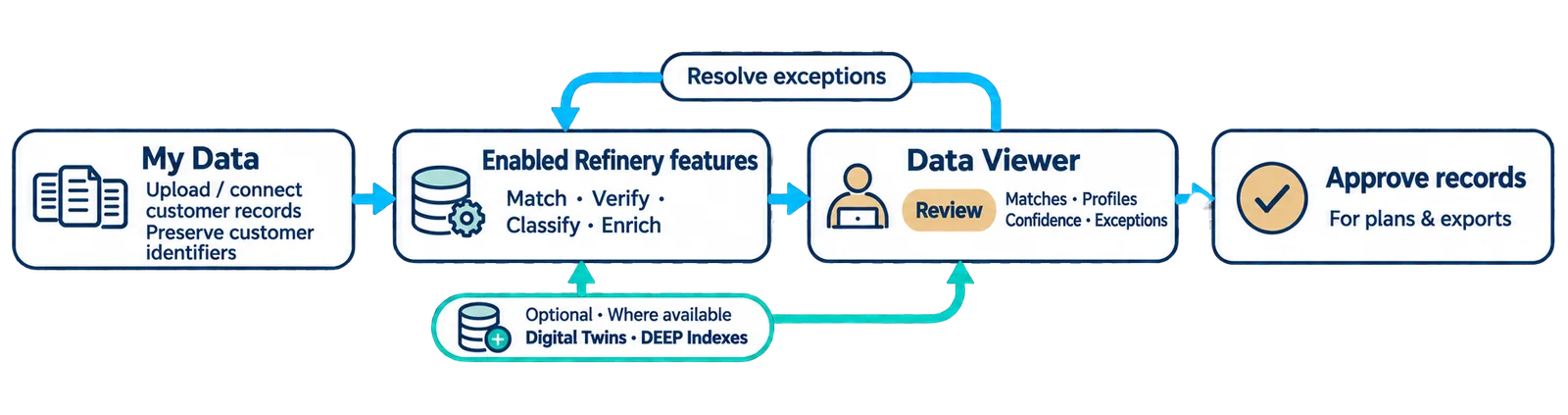
Through My Data, upload and map records or connect agreed feeds, preserving customer identifiers. Use enabled Refinery features to match, verify, classify and enrich locations, including Digital Twins and DEEP Indexes where available. Review matches, profiles, confidence and exceptions in Data Viewer, then apply approved records to plans and exports.

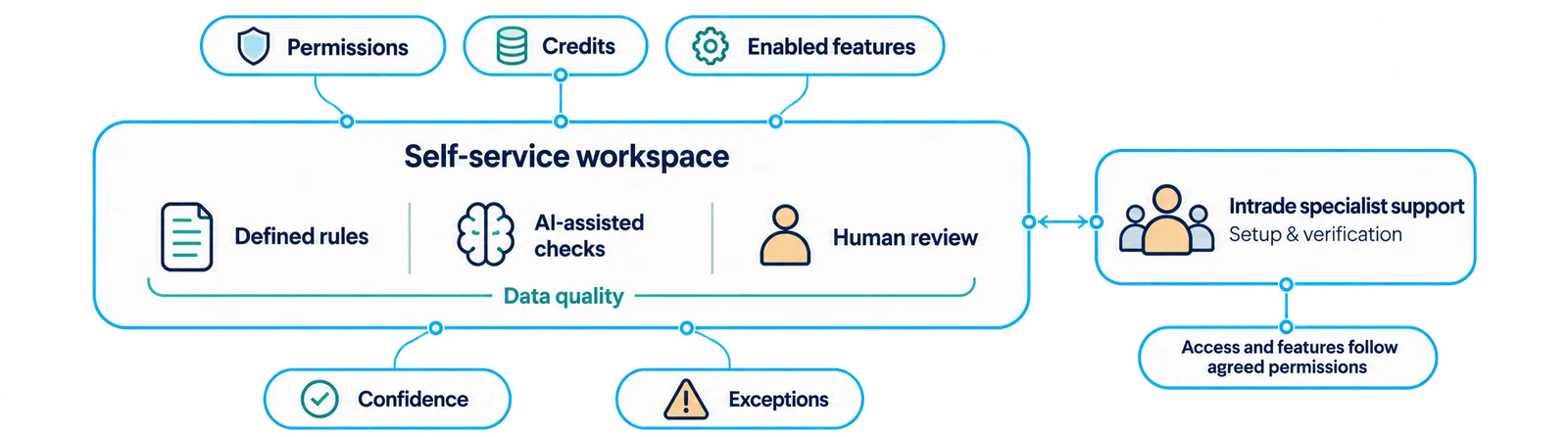
Rules, AI-assisted checks and human review support data quality. Self-service features, credits and permissions are agreed for your workspace, with Intrade specialists supporting setup and verification.

The Data Refinery strengthens the data. The Data Console makes it usable.

My Data → match, verify, classify, enrich → approved records
Self-service with visible confidence, exceptions, credits and permissions
The Refinery strengthens the data. The Console makes it usable.
INTRADE AFRICAMARKET360 DATA CONSOLE

FROM MARKET CONTEXT TO CONNECTED EXECUTION

A plan your other systems can use

Turn customer priorities, market potential and whitespace into targets, territories and routes for reporting and field execution.

Build the plan around your growth priorities

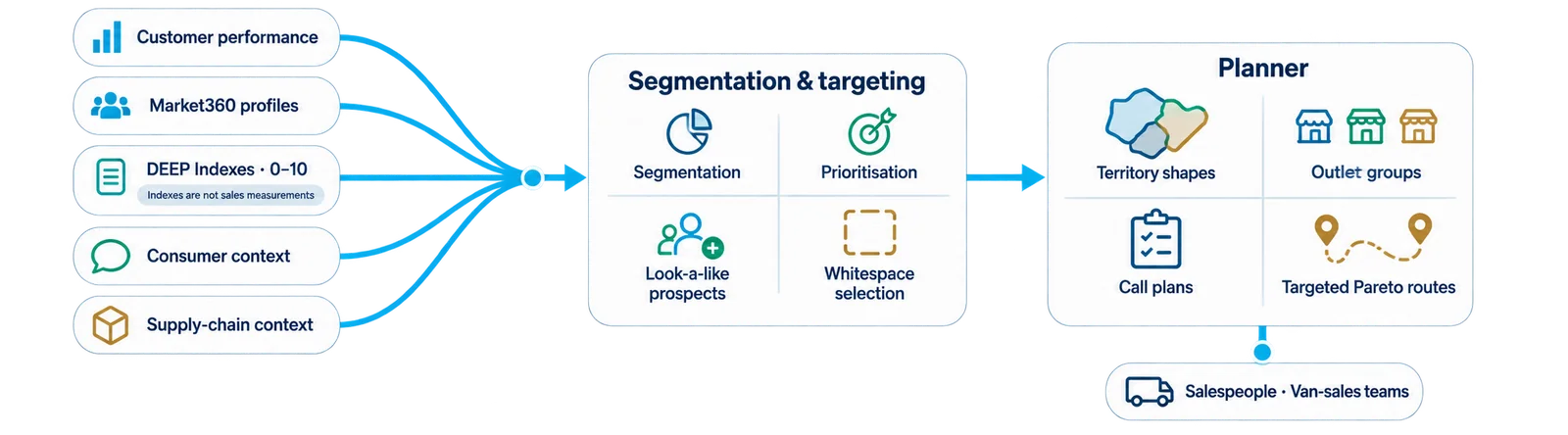
  • Segmentation and targeting. Combine customer performance, market profiles and DEEP Indexes—0–10 commercial scores—to prioritise customers, find look-a-like prospects and assess whitespace. Use consumer and supply-chain context to refine the selection.
  • Planner. Define territory shapes, outlet groups, call plans and targeted Pareto routes for salespeople or van-sales teams. Plan recruitment, route expansion, audits and activations around the opportunity and your existing footprint.
Segmentation and targeting become territories, call plans and Pareto routes

Integration-ready planning: shape, contents and context

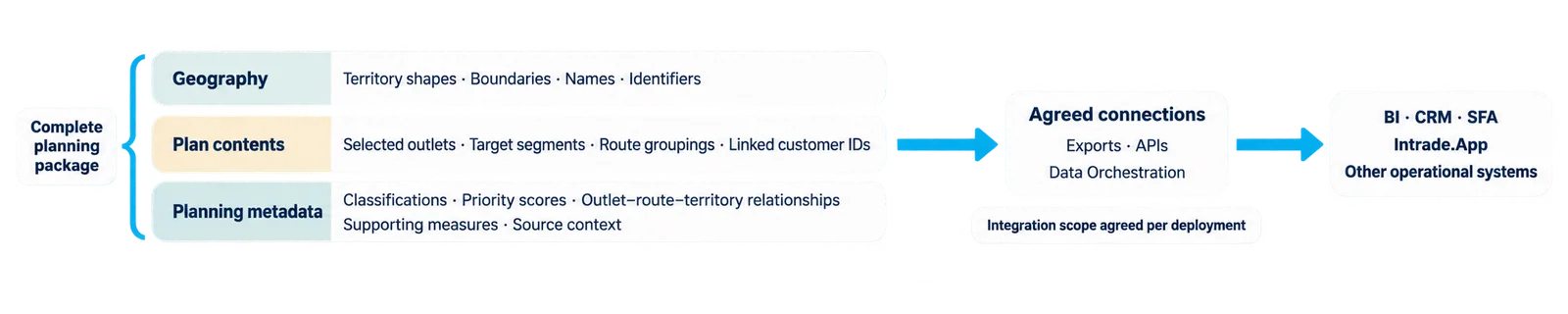
The Console prepares the structure of your plan for use across other systems:

  • Geography: territory shapes and area boundaries, with their names and identifiers.
  • Plan contents: selected outlets, target segments, route groupings and linked customer IDs.
  • Planning metadata: classifications, priority scores and the relationships connecting outlets, routes and territories, with agreed supporting measures and source context.

Agreed exports, APIs and Intrade’s Data Orchestration framework carry these outputs into business intelligence (BI), CRM, sales force automation (SFA), Intrade.App and other operational systems. Formats, field mappings and permissions are configured for the receiving system, so reporting and execution work from the same plan.

A plan has geography, contents and metadata
INTRADE AFRICAMARKET360 DATA CONSOLE
Plan structure deployed into BI and field execution

From customer coverage to productive routes

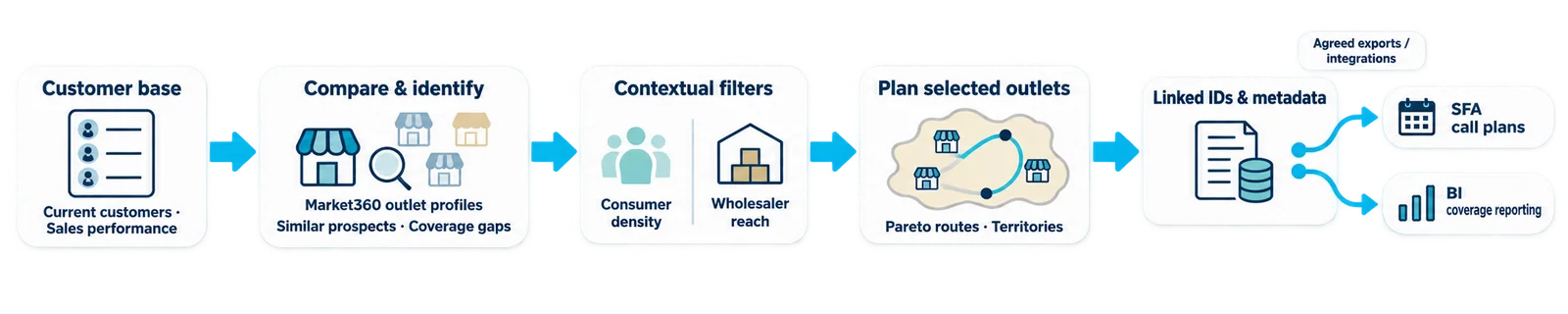
For example, a distributor can compare its customer base and sales performance with Market360 outlet profiles, identify similar prospects and assess coverage gaps. Consumer density and wholesaler reach add context to the shortlist. The selected outlets become Pareto routes and territories, with linked IDs and metadata feeding SFA call plans and BI coverage reporting.

Customer base → similar prospects → coverage gaps → routes and territories

What you get

A configured workspace for your data, Market360 intelligence or both; selected market, consumer and supply-chain context; enabled self-service Refinery features; and integration-ready targets, territories and routes. Plans include the shapes, identifiers and metadata needed to use them in your other systems.

What’s next? Activate, measure and refine.

  1. Deploy the plan. Connect territories, priority outlets and Pareto routes to your SFA or Intrade.App, equipping sales and van-sales teams for focused execution.
  2. Keep the picture current. Use Audit360 and add Pulse to follow execution and selected market signals, then refine coverage, route priorities and call cycles.
  3. Accelerate rollout. Intrade’s Growth Managed Services specialists can support planning, data maintenance and distributor-route deployment alongside your team.

Bring your data and a growth question. See your position in the market, find whitespace and put the plan to work.

Image development brief